
Plain Printable Calendar 2027: Free Templates vs. Vector PDF
Free printable calendars work at A4. But at A1 they blur. An honest comparison of free 2027 calendar templates vs. a paid vector PDF — and when each makes sense.
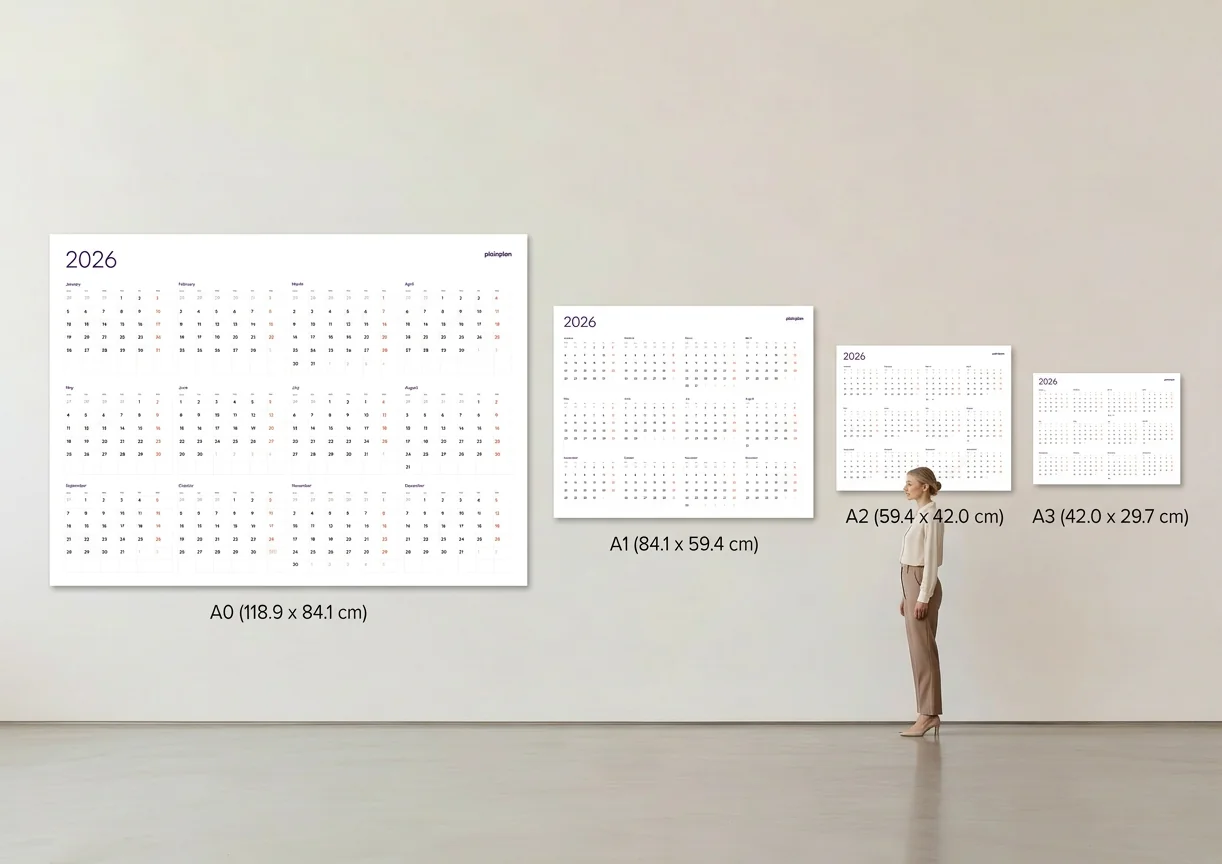
What “plain” actually means in calendar design
A plain calendar is one where the design gets out of the way. No decorative borders, no seasonal clip art, no motivational quotes competing with the grid. The week numbers are visible. The grid cells are large enough to write in. The contrast between the structure and the empty space is high enough to read quickly.
Plain is not the same as minimal in the trendy sense. A well-designed plain calendar has deliberate choices behind its proportions — how much space each week gets, how the month labels sit relative to the grid, how the week starts (Monday vs. Sunday). These decisions affect usability. A calendar that looks simple is often harder to design than one that looks decorated.
When people search for a plain printable calendar, they usually want something they can actually write on without the design fighting them. That’s a reasonable requirement, and it’s the standard both free and paid options should be evaluated against. For a deeper look at what makes a calendar genuinely functional, see our piece on what is a functional planner.
What free printable calendars actually include
Most free printable calendars are distributed as JPEG images or raster PDFs. They are designed at a fixed size — usually US Letter (8.5 × 11 inches) or A4 (210 × 297 mm) — and exported at a resolution that looks fine on screen and prints acceptably at that size.
The typical free calendar includes one layout, one paper format, and no language variants. It was designed for one use case. If that use case matches yours exactly — an A4 print for a desk or a refrigerator — a free template is perfectly adequate.
Some free vector PDFs do exist. Wikimedia Commons hosts calendar templates in SVG and PDF formats. Some design resource sites offer free vector downloads. These are genuinely scalable and worth considering. The limitation is usually the same: one layout, one language, one paper format family, and no guarantee the file has been checked for errors in the year’s dates. For an explanation of what a vector PDF actually is, we have a plain-language explainer.
Where free calendars fall short for large format
The point where free raster calendars stop working is large-format printing. If you want to print at A2, A1, or A0 — the sizes that work as actual wall planners in a shared space — a raster PDF at Letter or A4 resolution will blur. Text that read cleanly at desktop size becomes soft and unreadable when stretched across a poster.
The math is straightforward. A raster image at A4 resolution contains a fixed number of pixels for that one size. Scale it to A1 (four times the area) and the effective resolution drops sharply — to roughly a quarter of the original DPI. At that point, fine lines and small text look visibly degraded. A professional print shop may warn you or simply produce the output as-is.
This is not a flaw in the design of the free calendar — it was designed for the size it was designed for. The flaw is in the expectation that a single raster file will work at any size. If large-format printing is not in your plans, this limitation is irrelevant. If it is, our guide to printing a wall calendar at any size explains what to look for.
What a paid vector PDF adds
PlainPlan 2027 costs $6.99 and includes 24 files: two layouts (a weekly-row year view and a compact grid), two paper format families (EU A-series and US Arch proportions), and six languages. Every file is pure vector — sharp at A4, A2, A1, or A0 because the output is re-calculated at print time rather than stretched from a fixed pixel grid.
The paper format split matters more than it might seem. A calendar designed for A4 proportions looks slightly off when printed on Letter paper, and vice versa — the grid cells are not quite the right shape, the margins are unequal. PlainPlan includes separate files optimised for each format family, so the layout looks intentional on whatever paper your printer uses.
The practical benefit for most buyers is freedom: print once at A4 to check the layout, then print again at A1 for the wall. Reprint when the original fills up. Print one for the office and one for home. The $6.99 is a one-time cost that covers every print of the same file. For a broader look at the free calendar landscape, our guide to free yearly calendar templates is worth reading before you decide.
When not to pay for a calendar
If you want a small desk calendar at A4 or Letter, a free template is the right choice. The print quality is adequate at that size, the selection is wide, and spending money on a single-use desk calendar is hard to justify.
If you want a monthly view rather than a full-year view, most paid annual planners — including PlainPlan — are the wrong product. Monthly calendars have their own category of free and paid options, and a full-year wall planner is a different tool for a different purpose.
The decision point is size and reuse. Large format — A2 and above — requires a vector file to print cleanly. Multiple prints across different sizes require a file that holds up at each one. If neither of those applies to you, save the money.
The short version
Free printable calendar for a desk or refrigerator: use a free template. There are good ones available, and they do the job at A4.
Wall planner at A1 or larger, printed at a copy shop or plotted: use a vector PDF. A raster file at that size will produce visible degradation in text and lines. This is not a matter of preference — it’s a physical limit of raster graphics.
Somewhere in between — say, an A2 print for a home office — test the free option first. Open your PDF, zoom to 400%, and check whether the text edges are sharp or fuzzy. If they’re sharp, the file is vector and will print fine. If they’re fuzzy, you have a raster file and you’ll see the blur at A2. At that point, $6.99 for a clean print is a straightforward trade.

Frequently asked questions
A raster PDF contains a fixed grid of pixels — like a photograph. A vector PDF stores mathematical paths and instructions that are re-drawn at output time. Raster PDFs look sharp at the size they were designed for, but blur when scaled up. Vector PDFs stay sharp at any print size.
If the free calendar is a raster file (most are), printing it at A1 or larger will produce blurry output because the pixel data is stretched beyond its intended dimensions. Zoom to 400% in any PDF viewer — if text edges are fuzzy, the file is raster and will not print cleanly at large format.
A layout designed for A4 (210 × 297 mm) has different proportions than US Letter (8.5 × 11 inches). When you print the wrong format on your paper, margins are unequal and the grid cells look slightly wrong. Separate files for each format family ensure the layout looks intentional on whatever paper you use.
If you only need one A4 print for a desk or refrigerator, a free template is almost certainly adequate and the $6.99 is hard to justify. The value of PlainPlan is in large-format printing and reprinting — the same file for the office wall, the home wall, and the desk all at once.
Sources
Your year. Your wall.
One file. Any wall. Always sharp.